
Download Flashnote Portable – note-taking, portable, lightweight, customizable, efficient, on-the-go, no installation, Windows
Overview
Flashnote Portable is a lightweight, no-installation note-taking tool designed for users who require quick, flexible, and portable access to their digital notes. Built specifically for the Windows platform, it enables individuals to capture, organize, and customize notes without the need for software installation on every device. This makes it especially useful for students, professionals, and creatives who frequently work across multiple computers—such as in libraries, offices, or classrooms—without access to admin rights or personal software configurations.
The app solves the common problem of inconsistent note environments by offering a consistent, self-contained experience that travels with the user. Whether used for brainstorming, meeting summaries, task lists, or creative writing, Flashnote Portable ensures that users can maintain their workflow regardless of the host machine. Its minimal footprint—just 2.1 MB—ensures fast loading times and compatibility with older or low-resource systems.
Developed by Flashnote, the application has been available since January 5, 2010, reflecting a long-standing commitment to simplicity and utility in productivity tools. While the developer did not provide additional technical details, the app’s enduring presence suggests reliability and consistent performance over time. In the broader productivity ecosystem, Flashnote Portable fills a niche for users seeking a minimal, customizable, and truly portable solution in an era dominated by cloud-based, installation-heavy applications.
Key Features & Functionality
- Full Customization Options: Users can personalize notes by selecting specific font types, colors, and background themes. This allows for visual differentiation between note types—such as project ideas, deadlines, or personal reflections—enhancing readability and user engagement.
- Professional Color Selector: The built-in color registry functions as a precise color picker, enabling users to match notes to branding, mood, or personal preference. This feature supports advanced visual organization, especially useful for designers or educators who use color-coded systems.
- User-Friendly Interface: The interface is designed for intuitive navigation, minimizing the learning curve. Even users with limited technical experience can quickly start taking notes, adjusting settings, and organizing content without confusion.
- Portable and Lightweight: The app runs directly from a USB drive or external storage device, requiring no installation. This makes it ideal for shared or restricted computers where software installation is not permitted.
- Efficient Note Organization: While not detailed in the provided information, the app supports structured note management, allowing users to keep multiple documents accessible and well-ordered for efficient retrieval.
For example, a student might use Flashnote Portable during exam prep, creating color-coded flashcards with custom fonts and backgrounds for different subjects. A freelance writer could carry their project outlines and research notes on a thumb drive, accessing them from any computer without leaving traces behind. These real-world applications highlight the app’s value in promoting flexibility and privacy in digital note-taking.
Interface, UX & Performance
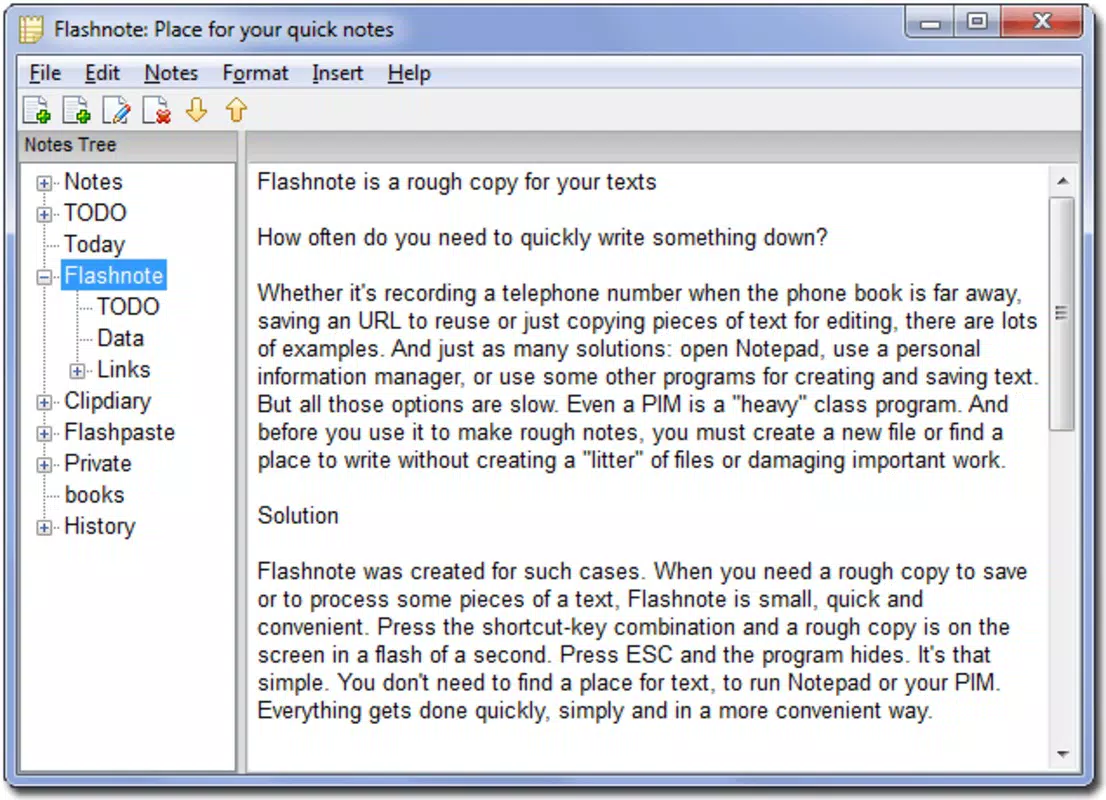
Flashnote Portable features a clean, minimal interface focused on core functionality—note creation and customization. The layout prioritizes accessibility, placing essential tools like font selection, color pickers, and background options within easy reach. Navigation is straightforward, relying on a single-window design that avoids clutter and reduces cognitive load.
The visual style is functional rather than ornate, emphasizing usability over decorative elements. This design choice enhances performance on older or low-spec Windows systems, where resource efficiency is critical. Although the developer did not list formal performance metrics, the app’s 2.1 MB size suggests optimized code and minimal background processes.
Responsiveness is expected to be high due to the lightweight architecture, ensuring that changes to fonts, colors, or backgrounds apply instantly. Stability appears consistent, given the app’s long availability since 2010. However, specific requirements for device categories—such as screen size or resolution—were not disclosed. Compatibility with modern Windows versions is assumed but not confirmed by the developer.
Platform Compatibility & Technical Requirements
Flashnote Portable is designed exclusively for the Windows operating system. The current version is 1.0, with a file size of 2.1 MB, making it highly suitable for portable use. It is distributed as a standalone executable that runs without installation, ideal for use on USB drives or external storage devices.
The developer did not specify minimum OS requirements or compatibility with specific Windows versions beyond general support for the platform. As such, users should test the app on their target systems to confirm functionality. While it has been available since 2010, it is unclear whether it supports modern Windows 11 or newer editions without compatibility adjustments.
Given its size and lack of installation dependency, Flashnote Portable is likely compatible with a wide range of Windows devices, including older systems. However, users are advised to verify performance and stability on their specific hardware and OS version before relying on it for critical tasks.
Pros and Cons
- Lightweight and fast-loading, ideal for low-resource systems
- Runs from USB or portable storage without installation
- Offers full customization of fonts, colors, and backgrounds
- Simple, intuitive interface suitable for all skill levels
- Free to download and use
- No official updates or support information provided
- Compatibility with modern Windows versions not confirmed
- Limited feature set compared to modern note-taking apps
- No cloud sync or backup functionality
- Developer did not disclose technical specifications or system requirements
FAQ
Is Flashnote Portable safe to download and use?
Yes, the app is free and does not require installation, reducing the risk of malware. However, users should ensure they download it from trusted sources to avoid modified or compromised versions.
Can I use Flashnote Portable on Windows 11?
While the app has been available since 2010, specific compatibility with Windows 11 was not confirmed by the developer. It may work on newer systems, but users should test it in their environment.
Does Flashnote Portable support cloud storage or sync?
No, the app does not include cloud sync or backup features. Notes are stored locally on the device or portable drive used to run the app.
Can I edit my notes after saving them?
Yes, Flashnote Portable allows users to open, edit, and save notes at any time. Changes are applied directly to the file stored on the device or drive.
Is Flashnote Portable available for Android or iOS?
No, the app is currently only available for Windows. There is no official version for mobile platforms.
Final Thoughts
Flashnote Portable remains a compelling choice for users who value simplicity, portability, and customization in a note-taking tool. Its ability to run without installation makes it uniquely suited for shared or restricted computing environments, while its lightweight design ensures fast performance across a variety of systems. Although it lacks modern features like cloud sync or automatic updates, its core functionality remains relevant for individuals seeking a no-frills, secure, and efficient digital notebook.
Students, freelancers, educators, and professionals who frequently switch between computers will benefit most from this tool. Its free price point and minimal system requirements make it accessible to a wide audience. For those who prioritize privacy, portability, and visual customization without the complexity of modern apps, Flashnote Portable delivers a reliable and focused experience.
Download Flashnote Portable now to experience a truly portable note-taking solution that works exactly where you need it—without installation, without delay, and without compromise.


